



Table of Contents
◉ Introduction ◉ The Short Answer ◉ Reader Roadmap ◉ Why Instagram Is a Great Starting Point but a Weak Operating System ◉ What Changes When You Build an Online Store ◉ Instagram Should Become Your Discovery Channel, Not Your Checkout Desk ◉ What Your First Online Store Actually Needs ◉ Choosing an Ecommerce Platform: What Actually Matters ◉ Step-by-Step: How to Move from Instagram Selling to an Online Store ◉ The Store Pages That Build Trust ◉ Privacy, Security, and Compliance Considerations ◉ Cost and ROI: What to Budget For ◉ Practical Example: A Small Brand Moving from DMs to Checkout ◉ Common Mistakes and Troubleshooting ◉ When Not to Build a Full Online Store Yet ◉ How to Keep Instagram Working After the Store Launch ◉ FAQ ◉ Conclusion ◉ Sources
Selling through Instagram can be a smart way to validate demand. A post gets comments. A Reel drives direct messages. A Story turns into a handful of orders. For many creators, boutiques, coaches, makers, and small brands, that is where the first real customer signal appears.
But Instagram is not the same thing as owning a digital business.
If you are still taking orders through DMs, tracking payments manually, answering the same product questions repeatedly, and hoping customers remember to come back, you are not just “keeping things personal.” You are carrying operational risk. Missed messages, payment confusion, inconsistent shipping updates, weak customer data, and limited checkout control can quietly cap your growth.
The practical next step is not abandoning Instagram. It is turning Instagram into a discovery and relationship channel while moving transactions, product information, customer records, policies, and repeat-purchase systems into an online store you control. That shift matters even more now because Facebook and Instagram Shops use website checkout, meaning customers are directed to the seller’s website to complete purchases rather than relying on native checkout inside Meta’s apps (Meta, 2025). (facebook.com)
This guide is for small business owners, creators, solopreneurs, and side-hustle operators who already have social proof on Instagram and want to build a more professional ecommerce operation without overcomplicating the process.
The Short Answer
To professionalize an Instagram-based business, keep Instagram as your top-of-funnel marketing channel, but move your core sales operation to an online store with product pages, secure checkout, shipping rules, tax settings, return policies, analytics, and customer communication workflows.
Start by choosing an ecommerce platform that fits your product type, budget, and technical comfort level. Shopify, Wix, Squarespace, WooCommerce, Square Online, and BigCommerce are common options, but the right choice depends on whether you sell physical products, digital goods, services, subscriptions, local pickup, or a mix.
The most important shift is ownership. Instagram gives you reach and engagement, but your own store gives you a structured catalog, better checkout control, clearer policies, customer data, email capture, analytics, and a destination you can connect to search, ads, email, and social commerce.
Do not wait until the business feels “big enough.” If you are receiving repeat orders, answering the same questions often, losing track of inventory, or asking customers to send payment screenshots, you are already at the point where a basic online store can reduce friction.
A professional store does not need dozens of pages at launch. It needs a clear homepage, strong product pages, trustworthy policies, secure payments, mobile-friendly design, customer support information, and a clean path from Instagram content to checkout.
Reader Roadmap
• How Instagram selling usually breaks down, so you can spot whether your current process is costing you orders.
• What an online store actually adds, so you can separate useful infrastructure from unnecessary tech.
• How to choose the right ecommerce platform, so you do not rebuild your store three months later.
• Which steps to follow first, so your store launch feels manageable instead of overwhelming.
• What mistakes to avoid, so you protect customer trust, payment security, and your brand reputation.
• How to keep Instagram valuable after launch, so the store strengthens your social selling rather than replacing it.
Why Instagram Is a Great Starting Point but a Weak Operating System
Instagram is excellent for attention. It gives small businesses a way to show products, tell stories, respond to customers, build trust, and test offers before investing in a full ecommerce setup.
That does not make it a complete business system.
A serious digital business needs more than visibility. It needs repeatable operations. Customers should be able to understand what you sell, compare options, check availability, pay securely, receive confirmation, track fulfillment, review policies, and contact support without depending on a conversation thread.
The problem with DM-based selling is not that it is unprofessional by default. Early-stage businesses often need direct conversations. The problem appears when the process becomes impossible to scale.
Common signs include:
• Customers ask “How much is this?” because pricing is buried in captions or Highlights.
• You manually send payment links or bank details for every order.
• Inventory is tracked in notes, spreadsheets, or memory.
• Shipping costs are calculated case by case.
• Customers do not receive automatic order confirmation.
• Returns, exchanges, and delivery timelines are explained differently each time.
• You cannot easily measure conversion rate, average order value, repeat purchase rate, or abandoned checkout behavior.
• Your customer list lives inside Instagram messages instead of a system you can legally and responsibly use for email, support, and retention.
In other words, Instagram can create demand, but it does not automatically create a business infrastructure.
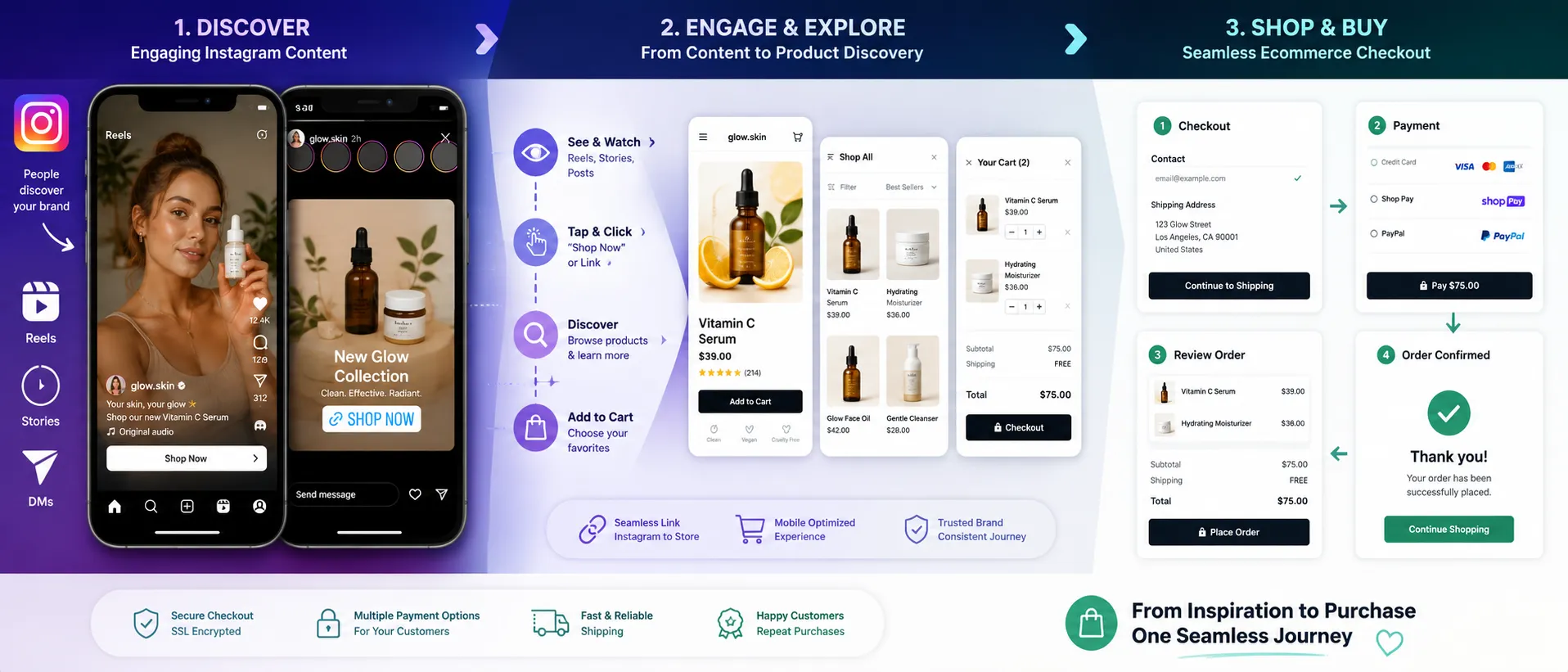
The visual above would help readers see the shift clearly: Instagram remains the place where people discover and trust the brand, while the store becomes the place where customers make decisions and complete purchases.
What Changes When You Build an Online Store
A professional online store is not just a prettier product catalog. It changes how your business works.
You control the buying experience
On Instagram, customers often move through scattered touchpoints: a Reel, a caption, a comment, a DM, a payment link, and maybe a follow-up message. A store gives them one organized destination.
A strong product page can answer questions before the customer asks them:
• What is included?
• What size, color, plan, or variation should they choose?
• How long does shipping take?
• What happens if the product arrives damaged?
• Is the product digital, physical, custom, handmade, or made to order?
• Are there care instructions, usage notes, or compatibility requirements?
That clarity can reduce hesitation and support requests.
You reduce manual work
Manual selling feels flexible until it becomes repetitive. Every repeated message is a hidden operational cost.
An ecommerce platform can automate or centralize:
• Product variants
• Inventory tracking
• Discount codes
• Taxes and shipping settings
• Order confirmation emails
• Payment processing
• Customer records
• Fulfillment status
• Returns or exchange instructions
• Analytics
Automation does not remove the human side of your business. It removes the avoidable friction that keeps you trapped in admin work.
You build a more durable asset
Instagram followers are valuable, but platform visibility can change. Your content reach may fluctuate because of algorithm updates, ad competition, audience behavior, or account issues.
A store gives you a more stable home base. It can receive traffic from Instagram, Google Search, email campaigns, referrals, paid ads, QR codes, marketplaces, and partnerships.
U.S. ecommerce is not a niche channel. The U.S. Census Bureau estimated total U.S. ecommerce sales for 2025 at $1.2337 trillion, up 5.4% from 2024 (U.S. Census Bureau, 2026). (census.gov) That does not mean every small brand should chase national scale, but it does show why having a reliable online buying experience matters.
Instagram Should Become Your Discovery Channel, Not Your Checkout Desk
The mistake many business owners make is treating the move to a store as a choice between social selling and ecommerce. The better approach is to connect them.
Instagram can still do what it does best:
• Show products in real-life situations.
• Build trust through behind-the-scenes content.
• Answer objections through Stories, Reels, Lives, and comments.
• Share customer education.
• Announce launches, restocks, and seasonal campaigns.
• Drive traffic to product pages, bundles, email signup forms, and landing pages.
Your store should do what Instagram does not do as well:
• Organize product information.
• Process payment securely.
• Apply shipping and tax rules.
• Capture customer information responsibly.
• Support search engine visibility.
• Provide a consistent brand experience.
• Track performance.
• Make repeat purchases easier.
Meta’s own commerce guidance reinforces the importance of a seller’s website. Its commerce eligibility requirements include representing your business and domain, being in a supported country, demonstrating trustworthiness, and providing accurate information (Meta, 2026). (help.instagram.com)
That means the website is no longer an optional “nice-to-have” for many Instagram sellers. It is part of how customers and platforms evaluate whether your business is legitimate.
What Your First Online Store Actually Needs
A beginner store does not need a complex tech stack. It needs the right essentials done well.
1. A clear homepage
Your homepage should answer three questions within seconds:
• What do you sell?
• Who is it for?
• What should the visitor do next?
Avoid vague brand slogans above the fold. If you sell handmade candles for apartment living, say that. If you sell digital Notion templates for real estate agents, say that. If you sell skincare for sensitive skin, make the use case clear while avoiding medical claims unless properly supported.
2. Product pages that reduce uncertainty
A product page should not rely on pretty photos alone.
Include:
• Product name
• Price
• Variants
• Size, dimensions, ingredients, materials, file format, or specifications where relevant
• Delivery or fulfillment expectations
• Care instructions or usage notes
• Return or exchange eligibility
• Customer support contact
• Product photos showing scale, detail, and use
• A clear call to action
For digital products, explain delivery format, access instructions, refund limitations, and compatibility. For physical products, explain shipping, handling time, and what customers should expect after checkout.
3. Policies customers can find before buying
A store should include clear policies for:
• Shipping
• Returns and exchanges
• Privacy
• Terms of service
• Contact/support
• Digital product delivery, if relevant
• Subscription cancellation, if relevant
Policies are not decoration. They reduce disputes, support tickets, chargebacks, and customer frustration.
4. Secure checkout and payment options
Customers expect checkout to feel familiar and safe. Your payment setup should use reputable payment processors and avoid unnecessary steps.
If you use a hosted ecommerce platform, review its official payment documentation and security responsibilities. For example, Shopify says its Facebook and Instagram by Meta sales channel can sync products to a catalog on Facebook and Instagram, subject to store eligibility (Shopify, 2026). (help.shopify.com)
Even when a platform provides secure infrastructure, merchants are still responsible for how they configure apps, collect data, use tracking scripts, manage accounts, and communicate with customers.
5. Mobile-first design
Instagram traffic is largely mobile. If your store looks good on desktop but feels clumsy on a phone, you may lose the very audience you worked hardest to build.
Check:
• Page speed
• Font size
• Button spacing
• Product image cropping
• Checkout flow
• Pop-ups
• Menu clarity
• Form fields
• Apple Pay, Google Pay, Shop Pay, PayPal, or other express checkout availability where supported
Your store does not need flashy animation. It needs a customer to move from interest to checkout without confusion.
Choosing an Ecommerce Platform: What Actually Matters
There is no universal best ecommerce platform for every Instagram seller. The right platform depends on what you sell, how much control you need, and how much technical work you are willing to handle.
| Platform approach | Often fits best when | Watch out for |
|---|---|---|
| Hosted ecommerce platform | You want product pages, checkout, apps, inventory, and social integrations in one system | Monthly costs, app fees, theme limitations, and plan-specific features |
| Website builder with ecommerce | You want a simple branded site and a small catalog | May become limiting for complex inventory, automation, or advanced ecommerce operations |
| WordPress plus WooCommerce | You want high control over content, SEO, and customization | Requires more maintenance, hosting decisions, plugin management, and security discipline |
| Marketplace-first setup | You want built-in marketplace demand and simpler early selling | Less control over branding, customer relationship, fees, and platform rules |
| Link-in-bio plus checkout tools | You need a lightweight bridge from Instagram to payment | Can feel fragmented if you have many products, policies, or fulfillment rules |
The goal is not to choose the most powerful platform. The goal is to choose the simplest platform that can support your next stage without creating avoidable migration pain.
Use Shopify when you want ecommerce infrastructure first
Shopify is often attractive for product-based sellers because it is built around ecommerce operations: catalog, checkout, inventory, fulfillment, payments, apps, and sales channels. Its official Facebook and Instagram by Meta channel is designed to sync Shopify products to Meta catalogs for Facebook Shop and Instagram Shopping, subject to eligibility (Shopify, 2026). (help.shopify.com)
It may be less ideal if you mostly need a content-heavy website and only sell a few items occasionally.
Use Squarespace or Wix when brand presentation is the priority
Website builders can work well for service providers, creators, portfolios, and small catalogs where design control and ease of editing matter. They can also be easier for nontechnical users who need a polished site quickly.
The tradeoff is that ecommerce workflows may feel less flexible if your product catalog, shipping logic, app ecosystem, or automation needs become more advanced.
Use WooCommerce when you want control and accept maintenance
WooCommerce can be powerful for businesses that want WordPress content and ecommerce together. It can work well for SEO-heavy sites, content marketing, niche publishing, and custom experiences.
The tradeoff is responsibility. Hosting, plugins, backups, updates, security, speed, and compatibility require more attention than many first-time sellers expect.
Use Square Online when in-person and local selling matter
If you sell at pop-ups, markets, events, or a physical location, Square’s ecosystem may fit because online and in-person sales can work together. That can be useful for businesses that need pickup, local delivery, or point-of-sale workflows.
The limitation is that your long-term flexibility depends on how much you want to customize beyond Square’s ecosystem.
Step-by-Step: How to Move from Instagram Selling to an Online Store
1. Audit your current Instagram sales process
Write down how a customer buys from you today.
Include every step:
1. They see a post, Reel, Story, or ad.
2. They comment or send a DM.
3. You answer questions.
4. You confirm product availability.
5. You send payment instructions.
6. They pay.
7. You confirm payment manually.
8. You collect shipping information.
9. You fulfill the order.
10. You send updates.
11. You handle returns, exchanges, or support.
Why it matters: this audit shows where the store should remove friction. Do not build pages randomly. Build around the real points where customers slow down, ask questions, or disappear.
Practical tip: review your last 20 customer DMs. The repeated questions should become product page content, FAQ answers, policy language, or checkout instructions.
2. Choose your store model before choosing the platform
Decide what kind of business you are building.
Are you selling:
• Physical products?
• Digital downloads?
• Courses or memberships?
• Services?
• Custom orders?
• Subscriptions?
• Local pickup?
• Preorders?
• Bundles?
Why it matters: your model affects checkout, taxes, delivery, refunds, inventory, email automation, and platform choice.
Practical warning: do not choose a platform only because a creator recommended it. A store that works for apparel may not be ideal for appointments, digital products, or made-to-order goods.
3. Secure your domain and brand basics
Buy a domain that is easy to spell, close to your brand name, and not confusingly similar to another business. Then set up a branded email address if possible.
Why it matters: a domain improves trust and gives you a stable destination beyond your social profile. Meta’s commerce eligibility guidance also emphasizes representing your business and domain accurately (Meta, 2026). (help.instagram.com)
Practical tip: avoid domains with unnecessary hyphens, odd spellings, or extensions that customers may mistype.
4. Build a small but complete catalog
Do not upload every possible product first. Start with your strongest products: proven sellers, high-margin items, repeatable inventory, or offers that already receive questions on Instagram.
For each product, include:
• Clear name
• Price
• Description
• Photos
• Variants
• Inventory status
• Shipping or delivery details
• Return eligibility
• Care or usage instructions
Why it matters: a smaller catalog with complete information usually performs better than a large catalog with weak pages.
Practical tip: if customers often ask the same pre-purchase question, answer it directly on the product page near the buying button.
5. Configure payments, shipping, taxes, and notifications
This is where many Instagram sellers rush. Do not.
Set up:
• Payment processors
• Shipping zones
• Delivery times
• Handling time
• Taxes based on your business requirements
• Order confirmation emails
• Shipping confirmation emails
• Customer support email
• Return instructions
Why it matters: checkout problems create distrust. A customer who buys through Instagram may tolerate informal communication once. A store customer expects reliable confirmation and clear next steps.
Practical warning: tax obligations vary by location, product type, and business activity. Use platform tools as a starting point, but consult a qualified tax professional for advice specific to your situation.
6. Connect Instagram to your store carefully
Once your store is ready, connect your Instagram profile, Meta Business assets, product catalog, and store platform where appropriate.
Meta says sellers create shops in Commerce Manager, which manages products and sales on Facebook and Instagram; Shopify sellers can connect through Shopify-supported workflows (Instagram Help Center, 2026). (help.instagram.com)
Why it matters: product tagging and catalog syncing can reduce friction from content to checkout, but eligibility, country support, policy compliance, and review processes still matter.
Practical tip: do not launch product tags before your product pages, policies, and checkout are ready. A broken first impression can hurt trust.
7. Update your Instagram content strategy
After the store goes live, your content should train customers to use it.
Post content that explains:
• How to order
• Where to find sizes or variants
• How shipping works
• What products are best for different use cases
• What is new, restocked, or limited
• Why buying through the store gives customers clearer confirmation and tracking
Why it matters: your existing audience is used to the old buying behavior. You need to redirect them without making the change feel cold or impersonal.
Practical example: instead of saying “DM to order,” say “View the full size guide and order through the product page linked in our bio. DM us only if you need help choosing.”
8. Launch with a customer-support plan
A store launch does not end when the site goes live.
Prepare for:
• Checkout questions
• Payment failures
• Address mistakes
• Discount code confusion
• Shipping questions
• Product variant errors
• Refund requests
• Inventory mismatches
Why it matters: the first week will reveal gaps. Treat those gaps as useful feedback, not as a sign that the store failed.
Practical tip: create saved replies for Instagram DMs that direct customers to the right product page, policy page, or support email.
A launch checklist visual would be useful here because the transition is operational. Sellers need to see payments, shipping, product pages, policies, analytics, and Instagram links as one connected system.
The Store Pages That Build Trust
A professional store does not need to be huge, but it does need to answer trust questions.
About page
Your About page should explain who is behind the business, what you sell, why it exists, and what makes the product or service credible. Avoid turning it into a long founder autobiography unless that story helps customers understand the product.
A good About page for a small brand might include:
• Founder or team context
• Product philosophy
• Materials or process
• Who the products are made for
• Location or fulfillment context, if relevant
• Customer promise, stated realistically
Contact page
Make support easy to find. Include a support email, expected response window, and links to shipping, returns, or order tracking.
Do not rely only on Instagram DMs for support once you operate a store. DMs can get buried, and customers may need a clearer record.
Shipping and returns pages
These pages should be plain, specific, and easy to understand.
Include:
• Processing time
• Shipping methods
• Delivery estimates
• Regions served
• Lost or damaged package process
• Return window
• Exchange rules
• Final sale items
• Digital product refund policy, if applicable
Privacy policy
If your store collects names, emails, addresses, payment information, analytics data, or marketing consent, you need a privacy policy that reflects your actual practices.
This is especially important if you use email marketing, advertising pixels, analytics tools, or third-party apps. Do not copy another store’s privacy policy blindly.
Privacy, Security, and Compliance Considerations
When you move from Instagram DMs to an online store, you also move into more formal data handling.
You may collect:
• Names
• Email addresses
• Shipping addresses
• Billing details
• Phone numbers
• Order history
• Customer service messages
• Analytics and advertising data
• Marketing consent
That information carries responsibility.
Use strong passwords and two-factor authentication on your ecommerce platform, domain registrar, email account, payment processor, and Meta Business assets. Limit staff access to only what each person needs. Remove access when freelancers, agencies, or employees stop working with you.
Be cautious with apps and plugins. Every extra app may add permissions, scripts, tracking, cost, or performance impact. Before installing an app, ask:
• What data does it access?
• Is it necessary?
• Who maintains it?
• Does it affect checkout or storefront speed?
• Can it conflict with another app?
• What happens if you uninstall it?
For marketing claims, reviews, and influencer content, follow truth-in-advertising principles. The FTC revised its Endorsement Guides in 2023 to address social media, reviews, and influencer marketing, and its guidance emphasizes that material connections between advertisers and endorsers should be disclosed clearly (FTC, 2023). (ftc.gov)
Accessibility also matters. The Department of Justice has issued accessibility requirements for state and local government web content under Title II of the ADA, using WCAG 2.1 Level AA as the technical standard for that rule (U.S. Department of Justice, 2024). (ada.gov) While private business obligations can be more nuanced, accessible ecommerce design is still a practical business priority: readable text, alt text, keyboard-friendly navigation, visible focus states, captions for important video content, and clear error messages can help more customers use your store.
This is not legal advice. For regulated products, health claims, privacy obligations, accessibility risk, tax issues, or subscription terms, consult qualified professionals.
Cost and ROI: What to Budget For
Building a store is not free, but neither is manual chaos.
Budget categories may include:
• Ecommerce platform subscription
• Domain name
• Theme or template
• Payment processing fees
• Apps or plugins
• Email marketing platform
• Product photography
• Copywriting
• Packaging
• Shipping materials
• Returns and replacements
• Accounting or bookkeeping tools
• Professional advice for tax, legal, or compliance needs
Avoid judging ROI only by immediate sales. A store can create value by reducing repetitive messages, improving customer confidence, increasing repeat purchases, making advertising more measurable, and giving you better data for decisions.
That said, do not overbuild. A first store should earn its complexity.
A good early-stage budget rule: pay for tools that reduce real bottlenecks, not tools that make the business look bigger than it is.
Practical Example: A Small Brand Moving from DMs to Checkout
Imagine a creator selling handmade planners through Instagram.
Before the store:
• Customers ask for prices in comments.
• The creator sends payment instructions manually.
• Inventory is tracked in a spreadsheet.
• Shipping addresses arrive through DMs.
• Customers ask for tracking updates.
• Repeat customers are hard to identify.
After launching a basic store:
• Instagram posts link to product pages.
• Customers choose planner style and color directly.
• Inventory decreases automatically after purchase.
• Payment is handled through checkout.
• Customers receive confirmation emails.
• Shipping updates are sent from the order system.
• The creator builds an email list for restocks and new drops.
The brand is still personal. The founder can still answer DMs, show behind-the-scenes production, and share customer stories. But the buying process no longer depends on the founder being online at the right moment.
That is the real professional shift.
Common Mistakes and Troubleshooting
Mistake: Building the store before clarifying the offer
Why it happens: sellers get excited about themes, logos, and apps before deciding what products deserve priority.
How to fix it: identify your top products from Instagram demand first. Use comments, saves, DMs, repeat questions, and actual orders to decide what goes into the first catalog.
Mistake: Sending Instagram traffic to a weak homepage
Why it happens: business owners link to the homepage because it feels safer than linking directly to products.
How to fix it: send traffic to the most relevant page. A Reel about one product should link to that product page or a curated collection, not a generic homepage.
Mistake: Hiding shipping costs until the last step
Why it happens: sellers are afraid shipping will discourage buyers.
How to fix it: be transparent early. Unexpected costs at checkout can cause abandonment. If shipping varies, explain the logic clearly.
Mistake: Copying another store’s policies
Why it happens: policies feel boring, so owners borrow language from a larger brand.
How to fix it: write policies that match your actual fulfillment, returns, product type, and customer support capacity. For legal documents, use platform generators as a starting point and get professional review when needed.
Mistake: Installing too many apps too early
Why it happens: ecommerce app stores make every problem look like it needs another tool.
How to fix it: start lean. Add apps only when you can name the specific problem, the expected benefit, and the data or permissions involved.
Mistake: Treating Instagram followers like automatic store customers
Why it happens: audience size can feel like guaranteed demand.
How to fix it: educate your audience. Show how to buy, explain the benefits of checkout, answer objections, and repeat the new process in Stories, Highlights, captions, and pinned posts.
Mistake: Ignoring analytics after launch
Why it happens: once the store is live, owners return to content creation and forget measurement.
How to fix it: review basic metrics weekly: sessions, conversion rate, top product pages, abandoned checkouts, traffic sources, average order value, and repeat purchase behavior. Use the data to improve pages, offers, and content.
An analytics visual would help readers understand that the store is not just a checkout page. It becomes the measurement layer for the business.
When Not to Build a Full Online Store Yet
A full ecommerce setup may be premature if you have not validated demand at all.
You may not need a complete store yet if:
• You have no repeat customer questions.
• You sell one-off custom work that requires consultation.
• Your product is still changing weekly.
• You cannot fulfill orders reliably.
• You do not know your pricing, shipping, or margins.
• You are testing a concept with a very small audience.
In that case, a simple landing page, waitlist, preorder form, or lightweight checkout link may be enough for the next step.
But do not confuse “testing” with staying stuck. If people are already trying to buy and your process is slowing them down, the business has outgrown informal selling.
How to Keep Instagram Working After the Store Launch
Your content strategy should become more intentional once your store exists.
Use Instagram for:
• Product education
• Objection handling
• New arrival announcements
• Restock alerts
• Founder storytelling
• Customer examples
• Tutorials
• Comparisons
• Behind-the-scenes content
• Seasonal campaigns
Update your profile:
• Use a clear bio that says what you sell.
• Link to your store or a curated link page.
• Pin posts that explain how to buy.
• Create Highlights for shipping, FAQs, reviews, sizing, or product categories.
• Use product tags where eligible and appropriate.
• Keep DMs available for support, but direct routine orders to the store.
This preserves the intimacy of Instagram while giving customers a better buying path.
FAQ
Conclusion
Moving from Instagram selling to an online store is not about becoming less personal. It is about making the buying experience more reliable.
Instagram can remain your best storytelling and discovery channel. But your store should become the operational center: product information, checkout, policies, customer communication, analytics, and repeat-purchase workflows.
Start small, but build seriously. A clean store with five well-presented products, clear policies, secure checkout, and a consistent Instagram-to-product-page path is more useful than a complicated site that confuses customers.
Before launching, review this quick checklist:
• Identify your best-selling or most-requested products.
• Choose an ecommerce platform that fits your product type and workflow.
• Secure a clear domain and branded email.
• Build complete product pages with photos, pricing, variants, and delivery details.
• Set up payments, shipping, taxes, and order notifications.
• Publish shipping, returns, privacy, and contact pages.
• Connect Instagram and product catalog tools only after the store is ready.
• Update your bio, Highlights, pinned posts, and captions to guide customers to checkout.
• Review analytics and customer questions weekly after launch.
A professional digital business does not depend on being online every time someone is ready to buy. It gives customers enough clarity and confidence to complete the purchase when they are ready.
Sources
• Meta — Commerce Eligibility Requirements — https://help.instagram.com/1627591223954487
• Meta — About Changes to Shops and Checkout on Facebook and Instagram — https://www.facebook.com/business/help/1314349509894768
• Instagram Help Center — Set Up a Shop on Facebook and Instagram — https://help.instagram.com/1187859655048322/
• Shopify — Facebook and Instagram by Meta Sales Channel — https://help.shopify.com/en/manual/online-sales-channels/social-commerce/facebook-instagram-by-meta
• U.S. Census Bureau — Quarterly Retail E-Commerce Sales Report — https://www.census.gov/retail/ecommerce.html
• Federal Trade Commission — Advertisement Endorsements — https://www.ftc.gov/news-events/topics/truth-advertising/advertisement-endorsements
• U.S. Department of Justice — Fact Sheet: New Rule on Accessibility of Web Content and Mobile Apps — https://www.ada.gov/resources/2024-03-08-web-rule/